
Module: postgraphs

This module finds the graph and wordcloud images and alt text files that were created by graph and wordcloud, and it creates a Mastodon post with these images attached. It assigns the alt text to each image and also uses that alt text as the body of the post.
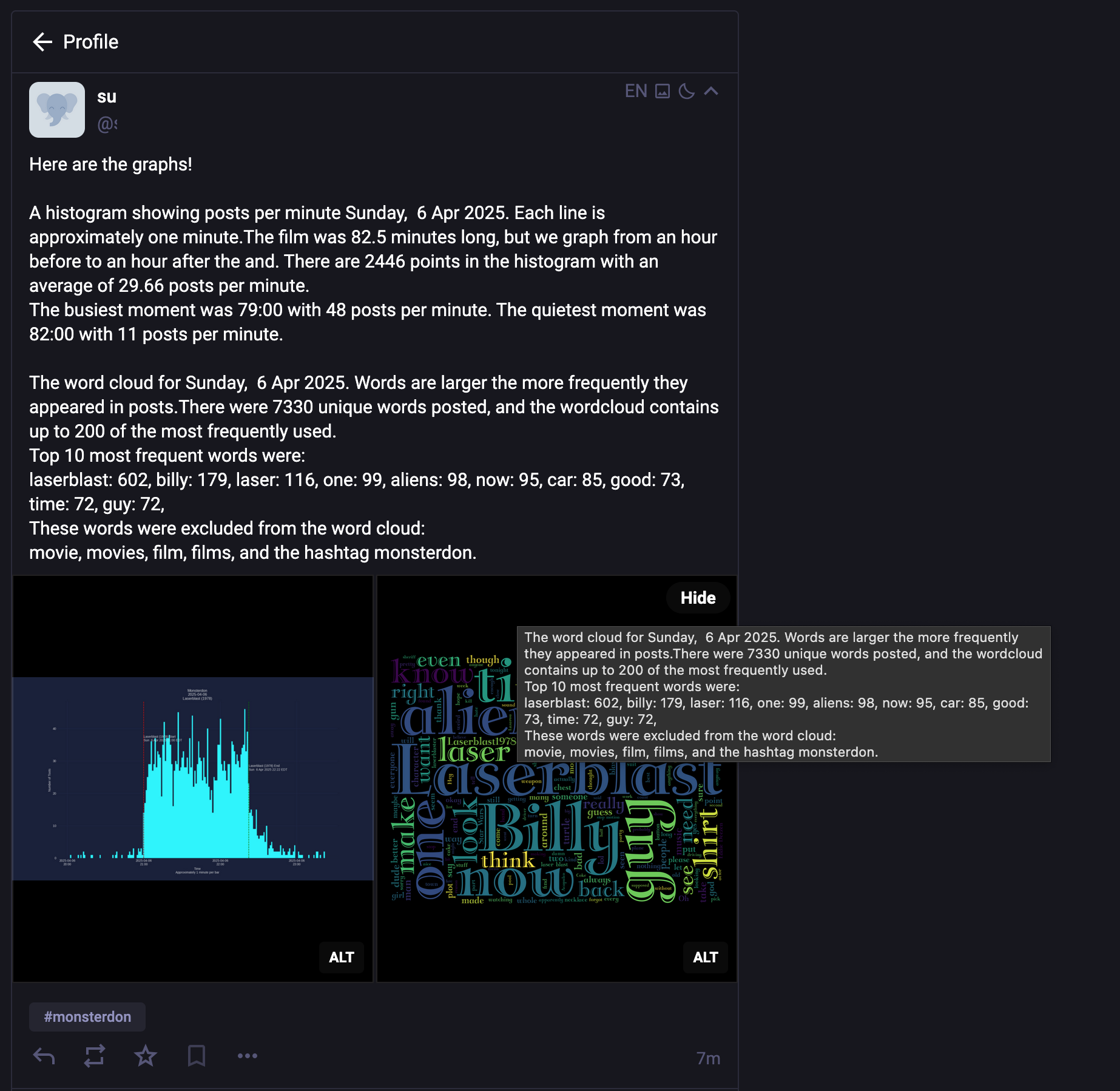
Example post

Configuration

The postgraphs module is controlled by the [postgraphs] section of the configuration file:

[postgraphs]
debug        = 20
visibility   = public
message      = Here are the graphs!

Configuration Options

Option Description
visibility Post visibility: public, unlisted, private, or direct (default: public)
message Custom message to include with the post

It will pull the standard Mastodon authentication parameters. But you can include different parameters in the [postgraphs] section of the config file.

[postgraphs]
api_base_url = https://example.social
cred_file    = /path/to/your/access_token.secret
botusername  = yourbotname

Usage

To post graphs to Mastodon:

mastoscore --debug=info ini/yourevent.ini graph
mastoscore --debug=info ini/yourevent.ini wordcloud
mastoscore --debug=info ini/yourevent.ini postgraphs

Code Reference

Module for posting graph and wordcloud images to Mastodon with their alt text.

This module finds the graph and wordcloud images along with their corresponding alt text files, and creates a post with these images attached.

find_graph_files(config)

Find the graph image and its corresponding alt text file.

Parameters:

Name Type Description Default
config ConfigParser

A ConfigParser object from the config module

required

Returns:

Type Description
list

A tuple containing (graph_image_path, graph_alt_text) or (None, None) if not found

Source code in mastoscore/postgraphs.py
21
22
23
24
25
26
27
28
29
30
31
32
33
34
35
36
37
38
39
40
41
42
43
44
45
46
47
48
49
50
51
52
53
54
55
56
57
58
def find_graph_files(config:ConfigParser) -> list:
    """
    Find the graph image and its corresponding alt text file.

    Args:
      config: A ConfigParser object from the [config](module-config.md) module

    Returns:
        A tuple containing (graph_image_path, graph_alt_text) or (None, None) if not found
    """
    hashtag = config.get("mastoscore", "hashtag")
    year = config.get("mastoscore", "event_year")
    month = config.get("mastoscore", "event_month")
    day = config.get("mastoscore", "event_day")
    date_str = f"{year}{month}{day}"

    # Define paths
    graphs_dir = create_journal_directory(config)
    graph_pattern = os.path.join(graphs_dir, f"{hashtag}-{date_str}.png")
    alt_text_pattern = os.path.join(graphs_dir, f"{hashtag}-{date_str}.txt")

    # Find files
    graph_files = glob.glob(graph_pattern)
    alt_text_files = glob.glob(alt_text_pattern)

    if graph_files and os.path.exists(graph_files[0]):
        graph_image_path = graph_files[0]

        # Read alt text if available
        if alt_text_files and os.path.exists(alt_text_files[0]):
            with open(alt_text_files[0], "r") as f:
                graph_alt_text = f.read()
        else:
            graph_alt_text = f"Graph of #{hashtag} activity on {date_str}"

        return graph_image_path, graph_alt_text

    return None, None

find_wordcloud_files(config)

Find the wordcloud image and its corresponding alt text file.

Parameters:

Name Type Description Default
config ConfigParser

A ConfigParser object from the config module

required

Returns:

Type Description
list

A tuple containing (wordcloud_image_path, wordcloud_alt_text) or (None, None) if not found

Source code in mastoscore/postgraphs.py
 61
 62
 63
 64
 65
 66
 67
 68
 69
 70
 71
 72
 73
 74
 75
 76
 77
 78
 79
 80
 81
 82
 83
 84
 85
 86
 87
 88
 89
 90
 91
 92
 93
 94
 95
 96
 97
 98
 99
100
101
102
103
104
105
def find_wordcloud_files(config:ConfigParser) -> list:
    """
    Find the wordcloud image and its corresponding alt text file.

    Args:
        config: A ConfigParser object from the [config](module-config.md) module

    Returns:
        A tuple containing (wordcloud_image_path, wordcloud_alt_text) or (None, None) if not found
    """
    hashtag = config.get("mastoscore", "hashtag")
    year = config.get("mastoscore", "event_year")
    month = config.get("mastoscore", "event_month")
    day = config.get("mastoscore", "event_day")
    date_str = f"{year}{month}{day}"

    # Get hashtag_fix value, default to 'as-is'
    hashtag_fix = config.get("wordcloud", "hashtag_fix", fallback="as-is")

    # Define paths
    wordcloud_dir = create_journal_directory(config)
    wordcloud_pattern = os.path.join(
        wordcloud_dir, f"wordcloud-{hashtag}-{date_str}-{hashtag_fix}.png"
    )
    alt_text_pattern = os.path.join(
        wordcloud_dir, f"wordcloud-{hashtag}-{date_str}-{hashtag_fix}.txt"
    )

    # Find files
    wordcloud_files = glob.glob(wordcloud_pattern)
    alt_text_files = glob.glob(alt_text_pattern)

    if wordcloud_files and os.path.exists(wordcloud_files[0]):
        wordcloud_image_path = wordcloud_files[0]

        # Read alt text if available
        if alt_text_files and os.path.exists(alt_text_files[0]):
            with open(alt_text_files[0], "r") as f:
                wordcloud_alt_text = f.read()
        else:
            wordcloud_alt_text = f"Word cloud for #{hashtag} on {date_str}"

        return wordcloud_image_path, wordcloud_alt_text

    return None, None

post_graphs(config)

Find graph and wordcloud images with their alt text and post them to Mastodon as threaded replies. Histogram is posted as a reply to the last text post, wordcloud as a reply to histogram.

Config Parameters Used

Option Description
postgraphs:message Custom message to include with the post
post:thread_visibility Visibility for graph posts (from post config)
mastoscore:hashtag Hashtag used for the analysis

Parameters:

Name Type Description Default
config ConfigParser

A ConfigParser object from the config module

required

Returns:

Type Description
int

Number of posts made (0, 1, or 2)

Source code in mastoscore/postgraphs.py
108
109
110
111
112
113
114
115
116
117
118
119
120
121
122
123
124
125
126
127
128
129
130
131
132
133
134
135
136
137
138
139
140
141
142
143
144
145
146
147
148
149
150
151
152
153
154
155
156
157
158
159
160
161
162
163
164
165
166
167
168
169
170
171
172
173
174
175
176
177
178
179
180
181
182
183
184
185
186
187
188
189
190
191
192
193
194
195
196
197
198
199
200
201
202
203
204
205
206
207
208
209
210
211
212
213
214
def post_graphs(config:ConfigParser) -> int:
    """
    Find graph and wordcloud images with their alt text and post them to Mastodon as threaded replies.
    Histogram is posted as a reply to the last text post, wordcloud as a reply to histogram.

    ## Config Parameters Used
    | Option | Description |
    | ------- | ------- |
    | `postgraphs:message` | Custom message to include with the post |
    | `post:thread_visibility` | Visibility for graph posts (from post config) |
    | `mastoscore:hashtag` | Hashtag used for the analysis |

    Args:
      config: A ConfigParser object from the [config](module-config.md) module

    Returns:
      Number of posts made (0, 1, or 2)
    """
    from .config import get_debug_level
    from .fetch import read_json

    # Get configuration values
    debug = get_debug_level(config, "mastoscore")
    thread_visibility = config.get("post", "thread_visibility", fallback="unlisted")
    custom_message = config.get("postgraphs", "message", fallback="")
    hashtag = config.get("mastoscore", "hashtag")

    # Set up logging
    logger = logging.getLogger(__name__)
    logging.basicConfig(
        format="%(asctime)s %(levelname)-8s %(message)s",
        level=logging.ERROR,
        datefmt="%H:%M:%S",
    )
    logger.setLevel(debug)

    # Get the last post ID from analysis results to thread from
    analysis = read_json(config, "analysis")
    reply_to_id = None
    if analysis and "tootlist" in analysis and analysis["tootlist"]:
        # Get the last post ID from the text posts
        reply_to_id = analysis["tootlist"][-1]
        logger.info(f"Will thread graphs from post ID: {reply_to_id}")

    # Find graph and wordcloud files
    graph_image_path, graph_alt_text = find_graph_files(config)
    wordcloud_image_path, wordcloud_alt_text = find_wordcloud_files(config)

    if not graph_image_path and not wordcloud_image_path:
        logger.error("No graph or wordcloud images found")
        return 0

    # Create Tooter object
    try:
        tooter = Tooter(config, "post")  # Use 'post' credentials
    except Exception as e:
        logger.critical("Failed to create Tooter object")
        logger.critical(e)
        return 0

    posts_made = 0
    graph_urls = []

    # Post histogram first
    if graph_image_path:
        try:
            media = tooter.media_post(graph_image_path, description=graph_alt_text)
            message = f"{custom_message}\n\n" if custom_message else ""
            message += f"{graph_alt_text}\n\n#{hashtag}"

            status = tooter.status_post(
                message,
                media_ids=[media["id"]],
                visibility=thread_visibility,
                in_reply_to_id=reply_to_id
            )
            logger.info(f"Posted histogram: {status['url']}")
            graph_urls.append({"name": "histogram", "url": status["url"]})
            reply_to_id = status["id"]  # Next post replies to this
            posts_made += 1
        except Exception as e:
            logger.error(f"Failed to post histogram: {e}")

    # Post wordcloud as reply to histogram
    if wordcloud_image_path:
        try:
            media = tooter.media_post(wordcloud_image_path, description=wordcloud_alt_text)
            message = f"{wordcloud_alt_text}\n\n#{hashtag}"

            status = tooter.status_post(
                message,
                media_ids=[media["id"]],
                visibility=thread_visibility,
                in_reply_to_id=reply_to_id
            )
            logger.info(f"Posted wordcloud: {status['url']}")
            graph_urls.append({"name": "wordcloud", "url": status["url"]})
            posts_made += 1
        except Exception as e:
            logger.error(f"Failed to post wordcloud: {e}")

    # Save graph URLs to data-{hashtag}-posts.json
    if graph_urls:
        from .fetch import update_json
        update_json(config, "posts", {"graph_posts": graph_urls})

    return posts_made